
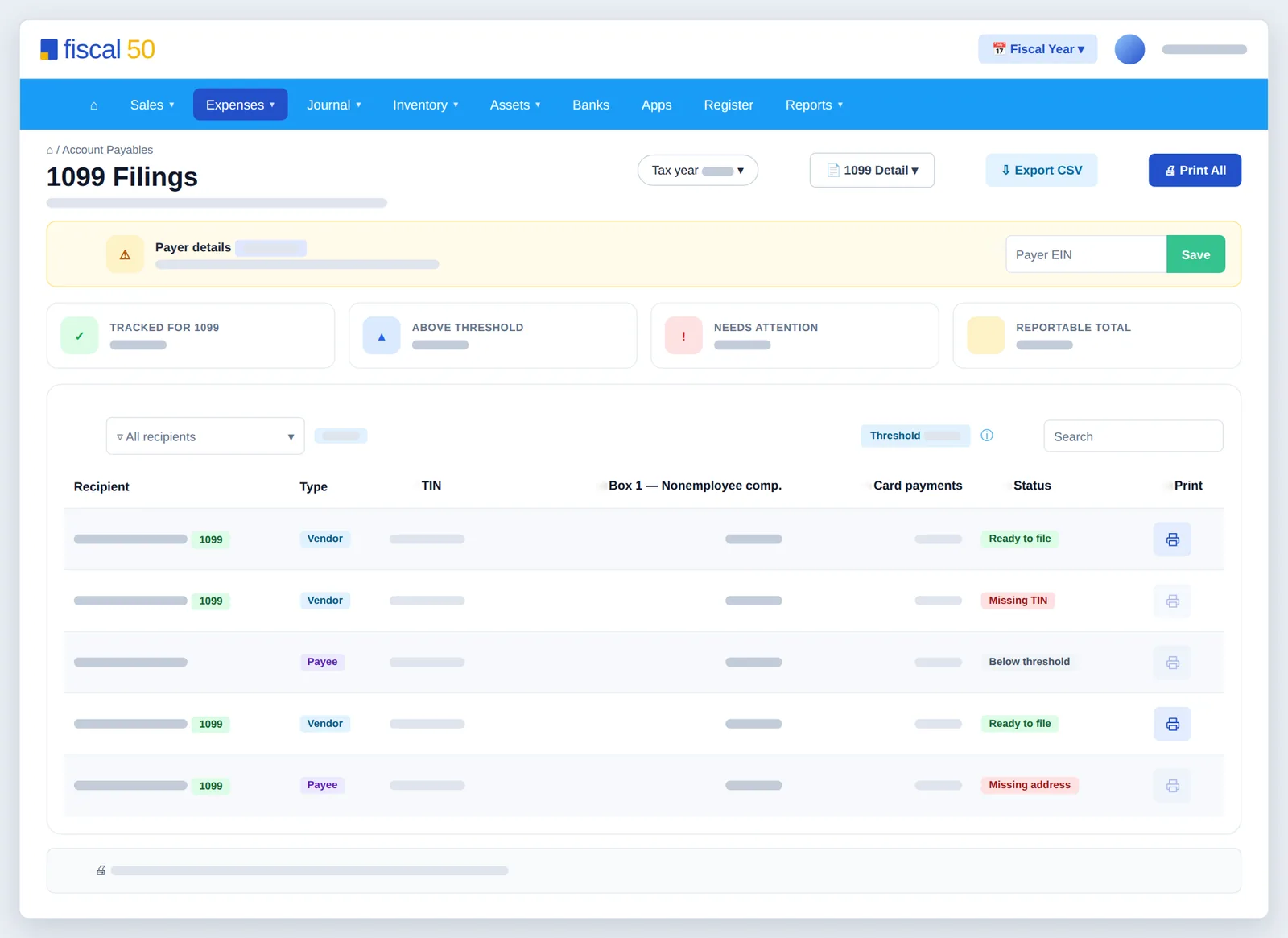
fiscal50 prepares Form 1099-NEC from the payments you have already recorded. For the tax year you choose, it adds up each recipient's non-card payments by payment date, compares them with the year's threshold ($2,000 for payments made in 2026, $600 for earlier years), and flags anyone with a missing TIN, address or vendor name. You can print recipient copies (Copy B) on plain paper, download a 1099 Detail report in Excel or PDF, and export a CSV in a Generic, Track1099, Tax1099 or TaxBandits column layout to upload to your 1099 filing service. fiscal50 prepares your 1099 information but does not file it with the IRS for you.
- Mark vendors and payees for 1099
- Protected SSNs
- Box 1 totals by payment date
See it work
Know who needs a 1099 before January
Non-card payments count toward each recipient’s Box 1 total by payment date, and missing TINs and addresses are flagged early.
1099 tracking
What 1099 tracking in fiscal50 does for you
1099 Filings prepares Form 1099-NEC for the vendors and payees you paid for services: it totals non-card payments per recipient for the tax year, checks TINs and addresses, and produces recipient copies (Copy B), an e-file CSV and a 1099 Detail report.
Mark vendors and payees for 1099
Tick Track payments for 1099 on a vendor (or switch on the 1099 toggle on the quick form); payees have the same SSN, EIN and 1099 tracking fields. Tracked recipients always appear in 1099 Filings with a green 1099 badge.
Protected SSNs
A vendor's SSN is encrypted before it is stored, kept in a secure vault apart from the vendor record, shown masked to the last 4 digits, and unlocked only when you generate the vendor's Form 1099.
Box 1 totals by payment date
Box 1 — Nonemployee comp. is the total paid by check, ACH or cash in the tax year, counted by payment date. Card payments are shown separately and left out of Box 1 because card processors report them on Form 1099-K.
Threshold and issue checks
Each recipient gets a status: Ready to file, Below threshold, Missing TIN, Missing address or Missing vendor name. Recipients with an issue can't be printed until it is fixed.
Summary cards and filters
Tracked for 1099, Above threshold, Needs attention and Reportable total cards sit above the list, and the filter narrows it to groups such as Ready to file or Needs attention, each with a count.
1099 Detail report
Download every payment behind each vendor's total in Excel (.xlsx) or PDF, with Type, Date, Ref #, Payment Method, Card? and a running Balance, and each total split into non-card and card amounts.
Print Copy B
Print one recipient's Copy B from their row, or Print All for one PDF covering every recipient at or above the threshold with no issues.
CSV export for e-filing
Export CSV in a Generic layout or the column layout of Track1099, Tax1099 or TaxBandits, with a field-mapping guide, to upload to your 1099 filing service, which files Copy A with the IRS.
How it works
How it works in fiscal50
Set up each recipient
On each contractor's vendor or payee record, set Vendor Type, enter the EIN (NN-NNNNNNN) or SSN (NNN-NN-NNNN), the mailing address, and tick Track payments for 1099.
Add your payer details
Open Expenses › 1099 Filings. If the Payer details banner says your EIN is missing, type it in the Payer EIN box and click Save.
Choose the tax year and fix issues
Choose the Tax year, filter to Needs attention, and edit each vendor or payee to add a missing TIN, address or name, then return to 1099 Filings.
Check the numbers
Click 1099 Detail and download the Excel or PDF report to see every payment behind each total.
Deliver and file
By January 31, Print or Print All to produce Copy B for recipients, and Export CSV in your filing service's format to e-file Copy A.
In your books
1099 Filings is a report and an export. It posts nothing, and tracking a vendor changes none of their bills or payments.
FAQ
1099 tracking: common questions
Does fiscal50 file my 1099s with the IRS?
No. It prepares recipient copies and a CSV you upload to a 1099 filing service, which files with the IRS.
What is the 1099-NEC threshold?
For payments made in 2026, $2,000. It was $600 for earlier years. The screen shows the threshold for the selected year.
Why are credit card payments not in Box 1?
Card processors report those payments on Form 1099-K, so they are excluded to avoid double reporting. You can include them in the CSV by turning on Include credit card payments in Box 1; it is off by default.
Which year does a payment count in?
The year it was paid, not the year of the bill. A bill dated in December and paid in January counts in January's year.
Which CSV formats are available?
Generic, which works with most importers, and column layouts for Track1099, Tax1099 and TaxBandits. Choose Generic if your filing service isn't listed.
Is the vendor's SSN kept secure?
Yes. It is encrypted when saved, stored separately in a secure vault, and shown masked. Lists and reports show only the last 4 digits; the full number is used only when you generate the vendor's Form 1099.
Related
Works well with
Vendor and payee management
Vendors and payees in one place: dashboards, advances and 1099 tracking.
Read moreBills and expenses
Vendor bills, emailed receipts, scheduled bills and vendor payments.
Read moreCheck printing
Print vendor checks on standard check stock, one or many at a time.
Read moreTax software export
Export books data for TaxAct and Intuit tax software.
Read moreMake this the last month you do bookkeeping by hand.
Start free. Connect a bank. Watch the agents go to work.