
The QuickBooks alternative that does the bookkeeping for you
fiscal50 covers the accounting you rely on in QuickBooks, adds AI that categorizes transactions and explains why, and imports your QuickBooks chart of accounts and trial balance during setup. Plans start at $5.50 a month, and the first month of Starter is free.
Why people switch
More done for you, for less
Explainable AI bookkeeping
A recommendation for every transaction with its reason, confidence and evidence. You post it, or change it first.
Auto-reconciliation
Ending balances predicted and checked against the bank, then every account reconciled month after month until something needs you.
Everything included
Inventory, fixed assets, proposals, checkout pages, check printing and 1099 tracking without add-ons.
Priced for small business
Starter $5.50, Business $19.50 and Business Pro $30.50 a month.
Learn it fast
An assistant on every screen and Academy lessons that follow the menus.
Made for bookkeepers too
A free-to-start Bookkeeper Workspace for many clients, with onboarding checklists for QuickBooks clients and partner prices on licences.
How to move
Five steps, most of them automatic
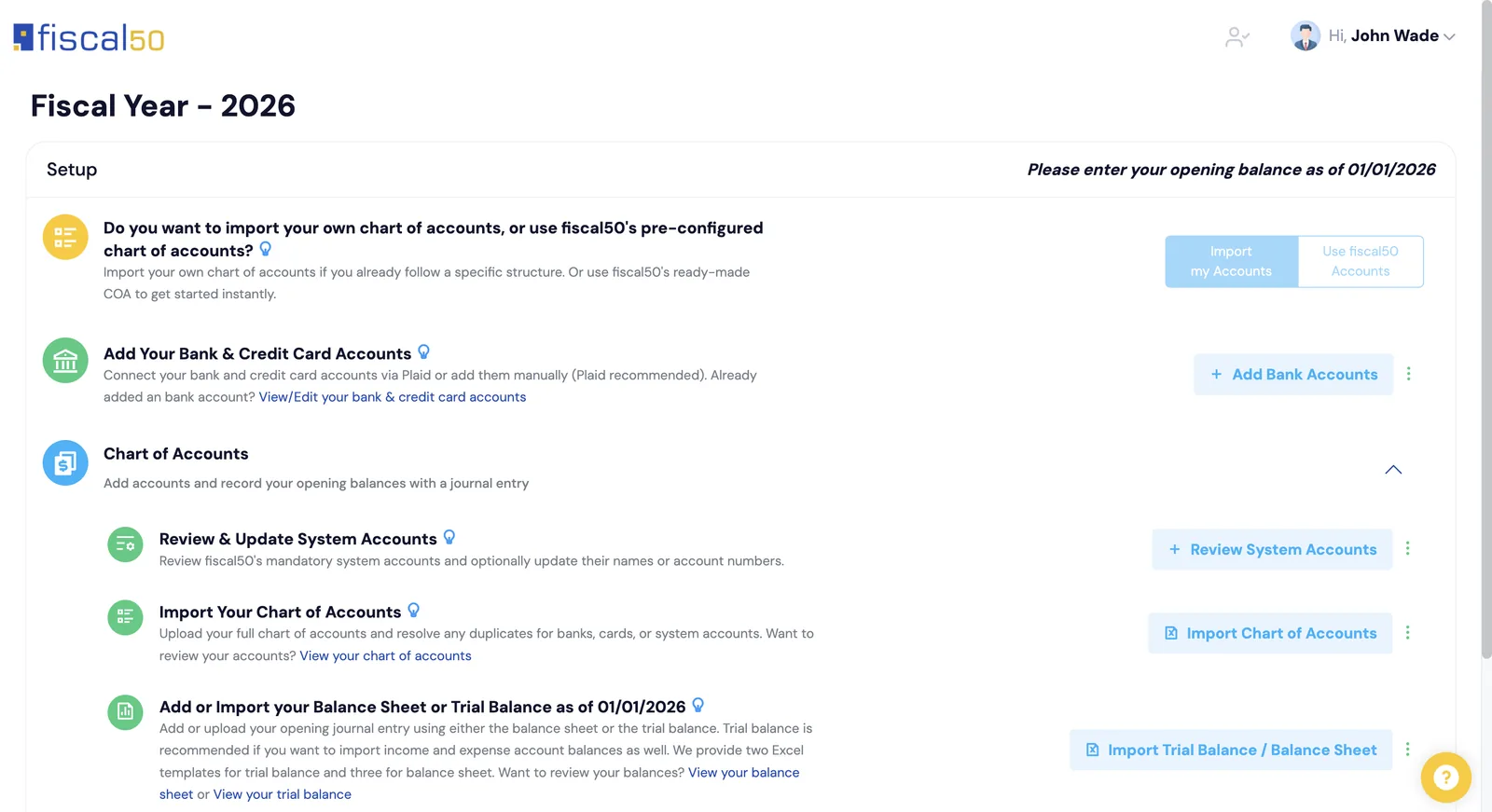
Upload your QuickBooks chart of accounts and trial balance once. The Configuration Agent matches every account, shows errors and warnings before anything is saved, and records your opening balances in one entry.
Checklist
What to export and bring
Export from QuickBooks
From QuickBooks Online or Desktop, export your chart of accounts and a trial balance as of the date your fiscal50 books will start.
Create your fiscal50 account
Pick your fiscal year and books start date. Starter’s first month is free.
Upload both files
The Configuration Agent reads the QuickBooks exports as they are, matches each account by name, checks that debits equal credits, and shows errors and warnings before anything is saved.
Connect banks and cards
Link accounts through Plaid. Bank-type accounts from your chart become bank and card records automatically.
Bring payroll and prior years
Import payroll from a QuickBooks IIF file or Gusto, and keep earlier year-end balance sheets as historical balance sheets.
FAQ
Switching questions
Is fiscal50 a good QuickBooks alternative for small businesses?
fiscal50 covers the core of small business accounting, including bank feeds, invoicing, bills, inventory, fixed assets, 1099 tracking and financial statements, and adds AI categorization that explains each decision. Plans start at $5.50 a month.
What data can I bring from QuickBooks?
Your chart of accounts and opening balances from a trial balance or balance sheet (QuickBooks Online or Desktop exports), customers, vendors, products and items in the format QuickBooks exports them, and prior-year balance sheets for comparison.
Do I lose my transaction history?
Transaction history is not migrated; your QuickBooks file stays where it is for reference. In fiscal50 your balances come across as opening balances on the day before your books start, which can be up to two years back. Bank transactions for earlier periods can be uploaded from your bank’s files.
How long does the switch take?
You export two files from QuickBooks, upload them together and review the Configuration Agent’s preview before you approve the import. Bookkeepers moving many clients get an onboarding checklist per client in the Bookkeeper Workspace.
Related
Next steps
Setup and migration
A Configuration Agent that imports your QuickBooks accounts and opening balances.
Read morePricing
Starter $5.50, Business $19.50, Business Pro $30.50 a month; first month of Starter free.
Read moreQuickBooks alternatives for bookkeepers
Xero, Zoho Books, Wave, FreshBooks and fiscal50 compared row by row for bookkeepers.
Read moreFor bookkeepers and firms
The Bookkeeper Workspace: every client in one login, month-end for every client on one board, client portal, CRM and billing. Connect is free.
Read moreBring your QuickBooks books over this afternoon.
Start free. Connect a bank. Watch the agents go to work.