
Proposals
Proposals that turn into invoices the moment they are approved
A fiscal50 proposal lists the products and services you plan to deliver, with prices, tax, shipping and a total, and your customer approves or declines it online. The customer opens it from an email, confirms their identity with a verification code, and needs no fiscal50 login. Once a proposal is approved, you create one-time, progressive or recurring invoices straight from it, and fiscal50 tracks how much has been invoiced and how much is still pending. A proposal is a quote, so nothing posts to your books until you create invoices from it.
Proposals
What proposals in fiscal50 does for you
Quote work to a customer, get their approval online, and turn the approved proposal into invoices without retyping anything.
Online approval, no customer login
fiscal50 emails the customer a secure review link. They enter a verification code sent to their email, review the proposal and attachments, then approve or decline it. They never need a fiscal50 account.
One-time or recurring proposals
One-time proposals cover a single engagement or purchase and can include products and services. Recurring proposals cover an ongoing service billed on a schedule and include services only.
Optional customer edits
Switch on Customer can edit when approving to let the customer change product quantities, change hours on hourly services and remove lines. They can never change rates or tax percentages.
Attachments and comments
Attach engagement letters, scopes of work or other files the customer can open while reviewing, and add comments that appear on the proposal page.
Responses in the Alerts and transactions bell
Approvals and declines, with the customer's comments, appear in the Alerts and transactions bell and in the Needs your attention card on your dashboard. Clicking one opens the Proposals list at that proposal.
Progressive invoicing
Bill a one-time proposal in several installments. You choose which lines, and how much of each, go on every invoice, and fiscal50 tracks what is pending.
Invoices that match what was approved
Create Invoice opens the normal invoice screen pre-filled from the proposal. The customer and each line's item, rate, quantity or hours and tax are locked; only descriptions can change.
Proposal Invoices tracking
One list shows every invoice created from proposals, with Installment N of M, Pending on proposal and Shipping incl.
How it works
How it works in fiscal50
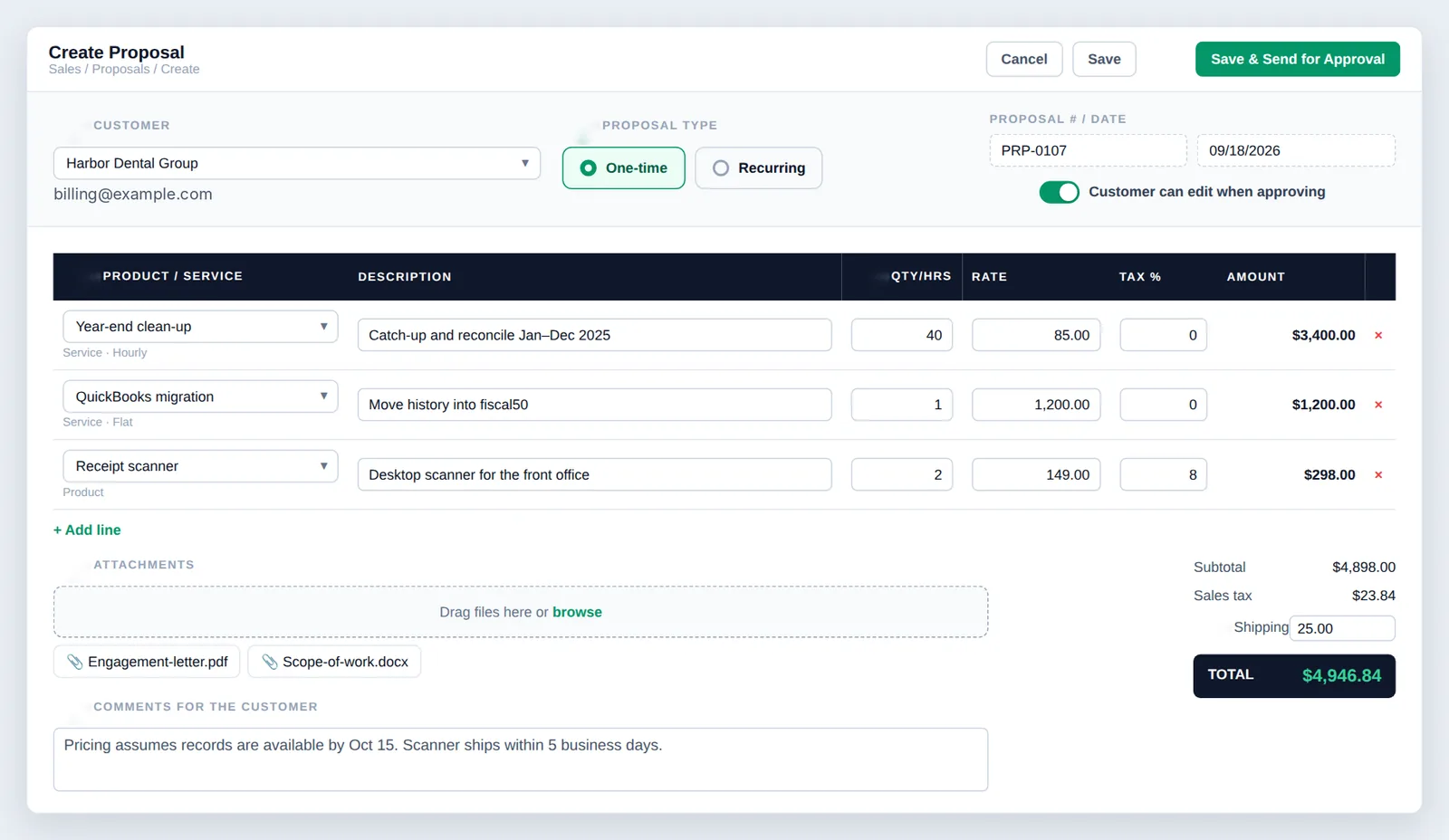
Open Create Proposal and pick the customer
Go to Sales → Proposals and click + Create Proposal. Choose the Customer and check the email shown underneath, because the review link and verification code go there.
Choose the proposal type
Choose One-time for a single engagement or purchase (products and services), or Recurring for an ongoing service (services only). Switching to Recurring removes product lines.
Add the lines
Click + Add line for each item and pick it in Product / service. Products are quantity × rate, flat-rate services are the rate (quantity stays 1), and hourly services are hours × rate. Set tax % per line and add a description.
Set edits, attachments, comments and shipping
Decide whether the customer can edit when approving, attach any documents, write comments for the customer and enter any shipping charge. fiscal50 calculates the Subtotal, Sales tax and TOTAL as you type.
Save & Send for Approval
Save keeps the proposal without emailing it. Save & Send for Approval saves it and emails the customer a secure review link.
In your books
What it posts
A proposal is a quote, so nothing posts until you create invoices from it. Each invoice then posts like any other.
Example amounts.
| Account | Debit | Credit |
|---|---|---|
| Accounts Receivable | 1,700.00 | |
| Revenue | 1,700.00 | |
| Total | 1,700.00 | 1,700.00 |
FAQ
Proposals: common questions
Does my customer need a fiscal50 account to approve a proposal?
No. They open the proposal from the email link and confirm with a verification code.
What is the verification code?
A one-time code fiscal50 emails to the customer's address, which they must enter before seeing the proposal. The address is partly hidden on screen, and Resend code sends a fresh one.
Can my customer change my prices?
No. Rates and tax percentages are always read-only for the customer. If you allow edits, they can only change product quantities, change hours on hourly services and remove lines.
What is progressive invoicing?
Billing a one-time proposal in several invoices. You choose which lines and how much of each go on each invoice, and fiscal50 tracks what is pending.
Can I invoice more than the proposal total?
No. Each line is capped at what is pending, and the total invoiced can never exceed the proposal total.
Does a proposal affect my books?
No. A proposal is a quote; nothing posts until you create invoices from it.
Related
Works well with
Invoicing
Invoices, recurring schedules, retainers, deferred income and customer payments.
Read moreCustomer management
Customer list, dashboards, timelines, statements, advances and import.
Read moreCheckout and online payments
Shareable payment pages, QR codes, and card and bank payments through Stripe.
Read moreApprovals and user access
Approval workflows, alerts and permissions by feature for every user.
Read moreMake this the last month you do bookkeeping by hand.
Start free. Connect a bank. Watch the agents go to work.